Home »
Blog » Page 66
Improvement Insights Blog
Latest Posts
“Our evolutionary instincts sometimes lead us to see patterns when there are none there. People have been doing this all the time – finding patterns in random noise.” – Tomaso Poggio
People just need a way to separate the Signal from the Noise.
Here are some insights from the book by Nate Silver.
Continue Reading "Signal versus Noise"
Posted by Jay Arthur in Data Mining, Improvement Insights, Jay Arthur Blog, Six Sigma.
People often get stuck before the “Analyze” phase of DMAIC because of ugly data.
You can’t analyze data until it is in the right format for analysis.
In this data about medications that might affect patient falls, we have to:
- Transpose the data
- Use Excel’s Text-to-column feature to split the meds into separate cells
- Use QI Macros UnStack Columns tool to get all of the meds into a single column
- Use QI Macros Data Mining Wizard to create a PivotTable and Pareto chart of medications involved in patient falls
You can watch the video below:
Continue Reading "It’s Hard to Do Data Analysis on Ugly Data… Part 2"
Posted by Jay Arthur in Data Mining, Improvement Insights.
This recent article talks about how GE measured Six Sigma success:
“Engineers and scientists were measured on how many Six Sigma projects they completed during the year.”
Since I know that 4% of the business is causing over half of the waste, rework and lost profit (the 4-50 rule), making everyone do “Six Sigma projects” is a form of overproduction (violating a Lean rule). It creates waste, rework and unhappy employees. It makes people put trivial improvements in Six Sigma format to achieve the goals.
Measure Six Sigma success by bottom-line, profit and productivity enhancing results, not projects. Use data to focus improvements to maximize results and minimize effort.
Continue Reading "Measuring Six Sigma Success"
Posted by Jay Arthur in QI Macros, Six Sigma.
Lean Six Sigma Fundamentalists believe:
– Get management commitment
– Train lots of black and green belts
– Implement wall-to-wall floor to ceiling
Lean Six Sigma Revolutionaries believe:
-Engage informal leaders
-Train money belts
-Laser-focused, data-driven breakthrough improvements
Continue Reading "Lean Six Sigma Fundamentalists vs Revolutionaries"
Posted by Jay Arthur in QI Macros, Six Sigma.
The next time you hit a glitch are you going to
0. Ignore it
1. Find a work around
2. Take heroic action to fix it.
3. Fix the glitch and then take the time to prevent it from ever happening again?
Continue Reading "Glitches are Opportunities"
Posted by Jay Arthur in QI Macros, Six Sigma.
The July/August 2017 HealthLeaders magazine had a series of charts about the impact of Adverse Events. In general, the magazine used column charts:
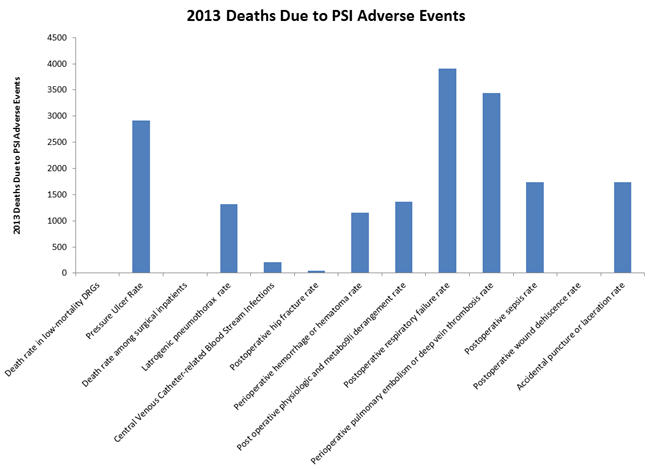
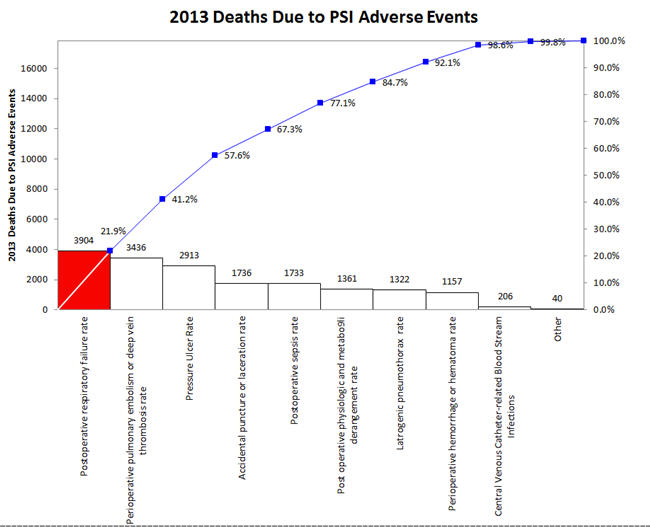
But wouldn’t a Pareto chart illuminate the important adverse events more clearly? The first three accounted for over 57% of 2013 deaths.
Continue Reading "Excel Bar Charts Hide The Signal in Noise"
Posted by Jay Arthur in Excel, QI Macros, Six Sigma.
May-June 2017 HBR discusses the results of a 10-year study of what makes CEOs great.
Of the four traits, number 4, Delivering Reliably, was found to be the most powerful of the four essential behaviors. Reliable CEOs were 15 times more likely to succeed.
I have found that one of the most effective ways to deliver reliably is to use Lean Six Sigma to simplify, streamline and optimize performance.
Continue Reading "Top Leaders Deliver Reliably"
Posted by Jay Arthur in Healthcare, Lean, Manufacturing, Service, Six Sigma.
I have found that an XmR chart is the easiest way to display attribute data. Simply convert the numerator/denominator into a ratio and plot the ratio.
- defects per day could be a c chart, but an XmR chart works just as well
- defects/samplesize could be np, p or u chart, but XmR chart works just as well using the ratio
Almost two decades ago, Tom Pyzdek said: X chart provides an excellent approximation to the p chart.
More recently, Donald Wheeler noted that XmR chart limits will be very close to c, np, p or u chart limits if the underlying distribution is correct.
Continue Reading "Use XmR Charts instead of c, np, p and u Charts"
Posted by Jay Arthur in QI Macros, Six Sigma, Statistics.
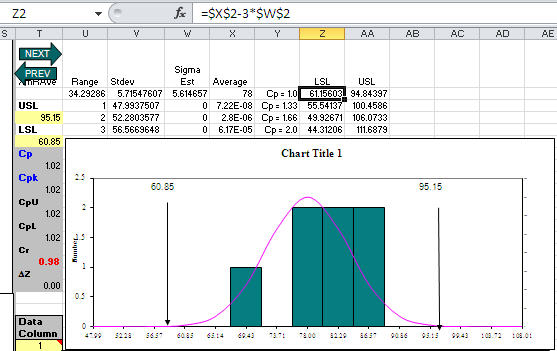
Customer asked me what seemed like a strange question: What specification limits do I need to get a Cp greater than one? Usually her customer should set specification limits, but her boss wanted to know what they could deliver. Hmmmm!
Then I realized that since QI Macros templates (e.g., XmR chart) calculate the average and sigma estimator, the LSL/USL for Cp = 1.0 would be:
LSL = Average – 3*SigEst USL = Average+ 3*SigEst
For Cp = 1.33, just change the 3 to a 4; Cp = 1.66, change the 3 to a 5. Here’s an XmR chart template with some sample data and calculations to reverse engineer spec limits:
Continue Reading "What USL/LSL Do I Need for Cp>1?"
Posted by Jay Arthur in QI Macros, Six Sigma, Statistics.
A customer called upset about Cpk. He had a runout of 0.010, but was getting a very low Cpk. Turns out he’d made the classic mistake of confusing a hard limit (e.g., zero) with a specification limit. I had him use QI Macros with an Upper Specification limit (USL) and no Lower Specification Limit (LSL). His Cpk immediately jumped to a more expected value of 1.78.
Later in the day another customer asked why Cpk is calculated as the minimum of the upper or lower Cpk? Because you use the one closest to the average. I think that customer may have had the same problem, confusing a hard limit with a specification limit.
Continue Reading "Cpk and Hard vs Specification Limits"
Posted by Jay Arthur in QI Macros, Six Sigma.






